
1. 🧠 The Anatomy of a Legend: What Makes a "Documentary Voice"?
Before we touch any software, we need to understand our target. If you don't know what you are aiming for, you will miss. A documentary narrator's voice is distinct from a news anchor or a YouTuber. It relies on three psychological pillars:
A) The Pacing (The Pauses)
A narrator is never in a rush. They know the visuals are telling the story, and the voice is merely the guide. The biggest mistake AI beginners make is feeding a long block of text into the engine. The result? A voice that fires words like a machine gun. A legend like Attenborough breathes between thoughts. He lets the silence do the heavy lifting.
B) The Dynamic Range (The Drama)
Human speech is not linear. When describing a lion stalking its prey, the voice should be tense, quiet, and sharp. When describing a sunset over the ocean, it should be warm, deep, and philosophical. Early AI models were "monotone," but 2026 models can understand semantic context—they know when to whisper and when to shout.
C) The Low-End Authority (The Rumble)
Think of Morgan Freeman. What makes his voice soothing? It’s the resonance in the chest—the low-frequency vibrations (around 80-150Hz). This range signals "authority" and "trust" to the human brain. We will learn how to artificially boost this in the Post-Processing section.
2. 💎 The Premium Route: Mastering ElevenLabs
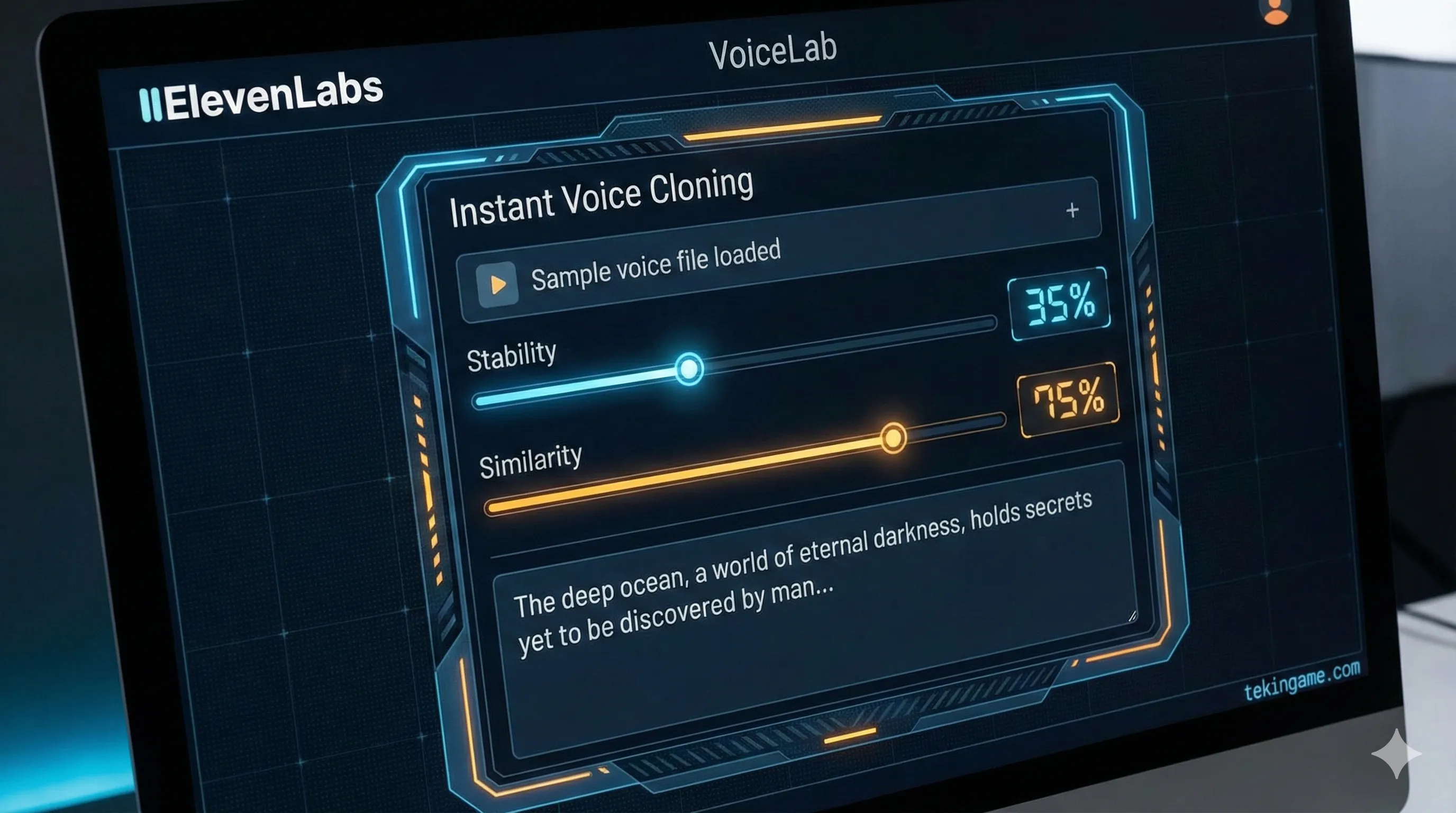
Let's start with the heavy hitter. ElevenLabs is currently the undisputed king of AI Text-to-Speech (TTS). Their Multilingual v2 and Turbo v2.5 models are frighteningly realistic.
Step 1: The Sample (Garbage In, Garbage Out)
To clone a voice, you need a sample.
Crucial Tip: The AI mimics the delivery of your sample, not just the sound. If you upload a 1-minute clip of someone shouting excitedly at a football game, your "Documentary Narrator" will sound like they are shouting at a football game.
The Fix: Record yourself (or find a sample) that is calm, slow, and articulate. Read a Wikipedia article about Quantum Physics. Use a decent microphone. This "clean" data is what the AI needs to build a flexible model.
Step 2: Decoding the Magic Sliders
Once you are in the VoiceLab, you will face the "Generation" panel. This is where most people fail because they leave the settings on default.
- Stability: This is the chaos meter.
High (100%): The voice is perfectly stable, no errors, but sounds robotic and boring.
Low (30%): The voice becomes incredibly expressive, breaths more, has "vocal fry," but might make mistakes or go off-script.
Inspector's Formula: For documentaries, set this to 35% - 45%. We want the "imperfections" that make it sound human. - Similarity: How much should it adhere to the original sample?
Keep this around 75%. If you push it to 100%, the AI tries to replicate the background noise and artifacts of the original file, which lowers quality. - Style Exaggeration:
This forces the AI to "act" more. For a dramatic nature documentary, bump this up to 20%. Any higher, and the AI might start acting drunk or unstable.
The Secret Weapon: Speech-to-Speech
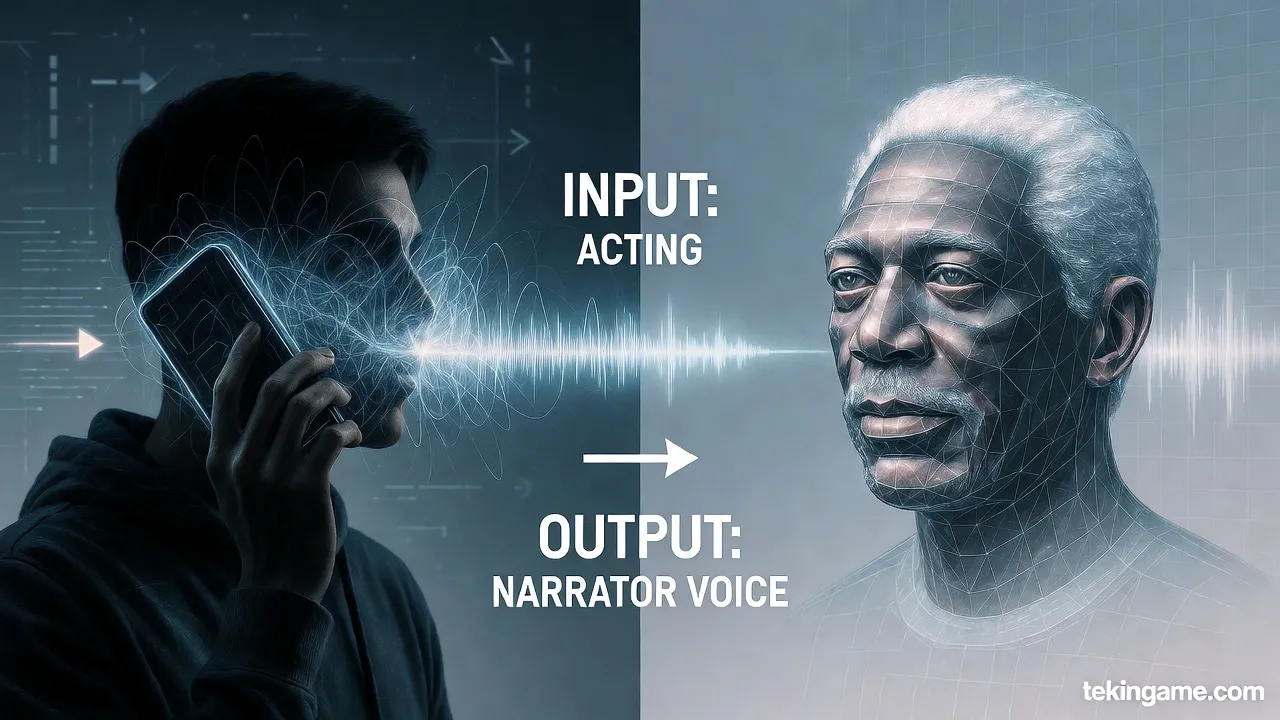
This feature is a Game Changer. Instead of typing text, you record yourself speaking the lines.
You provide the Performance (the timing, the laughs, the whispers), and ElevenLabs provides the Voice.
Why use this? Because no matter how good prompts are, AI still struggles with comedic timing or dramatic irony. With Speech-to-Speech, YOU are the actor; the AI is just the makeup.
3. 📝 Audio Prompt Engineering: Writing for the Ear
You can "direct" the AI using punctuation. Think of punctuation marks not as grammar, but as musical notation for the AI engine:
- The Comma (,): A short, micro-pause. Use this to break up long sentences.
- The Ellipsis (...): A long, dramatic pause. Use this for tension.
Example: "The creature waited... watching... and then struck." - The Dash (—): A sudden shift in tone or a hard break.
- Quotation Marks (" "): The AI often shifts its tone slightly when reading quotes, distinguishing the narrator from the character.
Pro Tip: If the AI is speaking too fast, manually type [pause] or ... between paragraphs. Force it to slow down.
4. 🛠️ The Open-Source Route: OpenVoice & MyShell
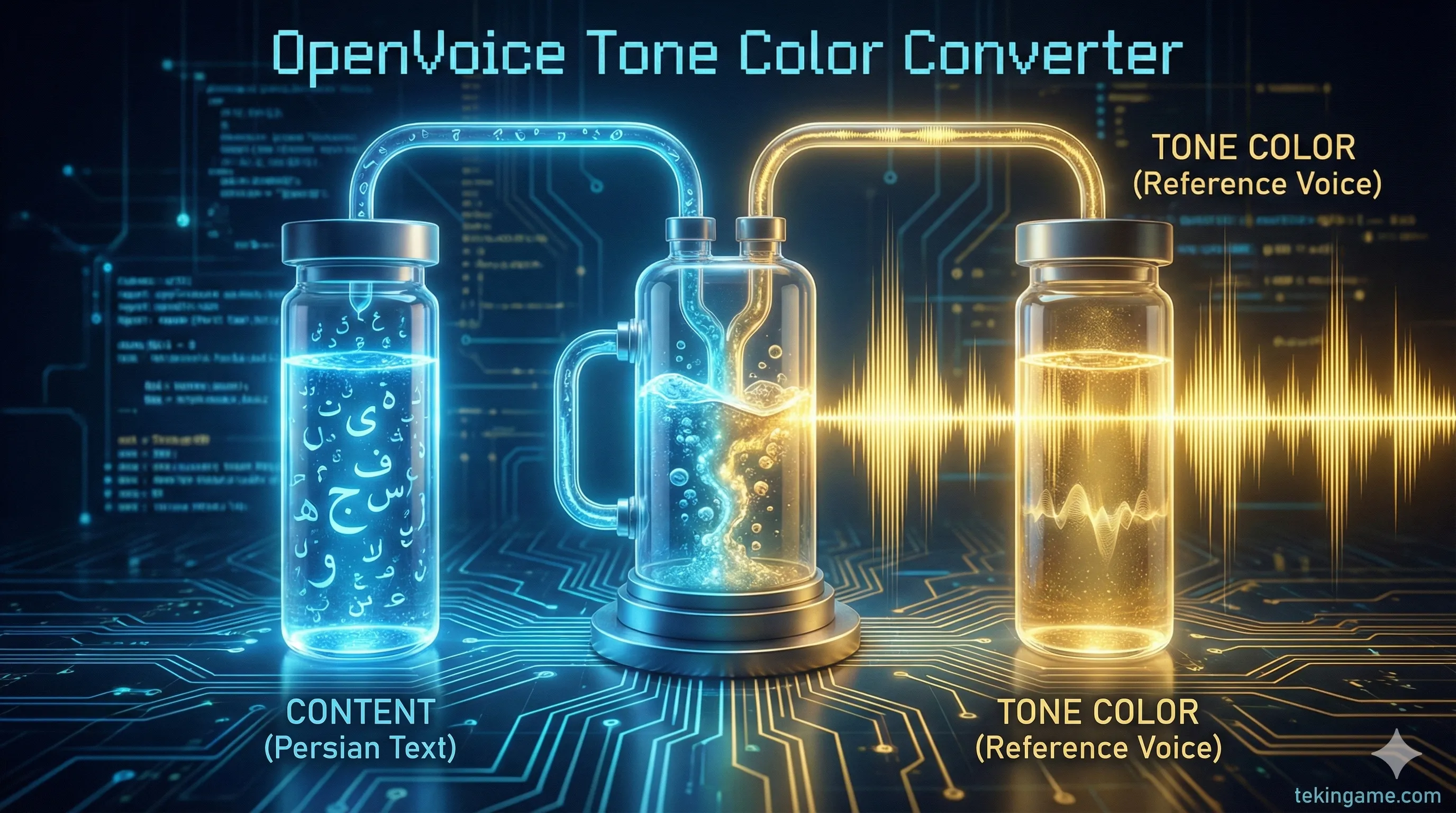
If you don't want to pay a monthly subscription, or if you want to experiment with cutting-edge tech, look at OpenVoice. Developed by researchers at MIT, it introduces a concept called Tone Color Converter.
The Architecture: Content vs. Tone
OpenVoice separates speech into two streams: 1. Content: What is being said (Language, Phonemes). 2. Tone Color: Who is saying it (Timbre, Pitch, Resonance).
This allows for "Zero-Shot Cross-Lingual Voice Cloning." You can take a sample of a Japanese anime character and make them speak fluent English or Persian, retaining their unique vocal texture.
How to use it (The Easy Way)
Running OpenVoice locally requires Python and a powerful GPU. However, the team partnered with MyShell.ai to offer a web interface. 1. Go to MyShell. 2. Select the OpenVoice widget. 3. Upload your "Reference Audio" (The narrator voice you want). 4. Type your text (or upload your own voice as the "Source"). 5. The AI "paints" the tone of the reference onto your source. It’s like a deepfake face-swap, but for audio.
5. 🎚️ The Virtual Studio: Post-Processing
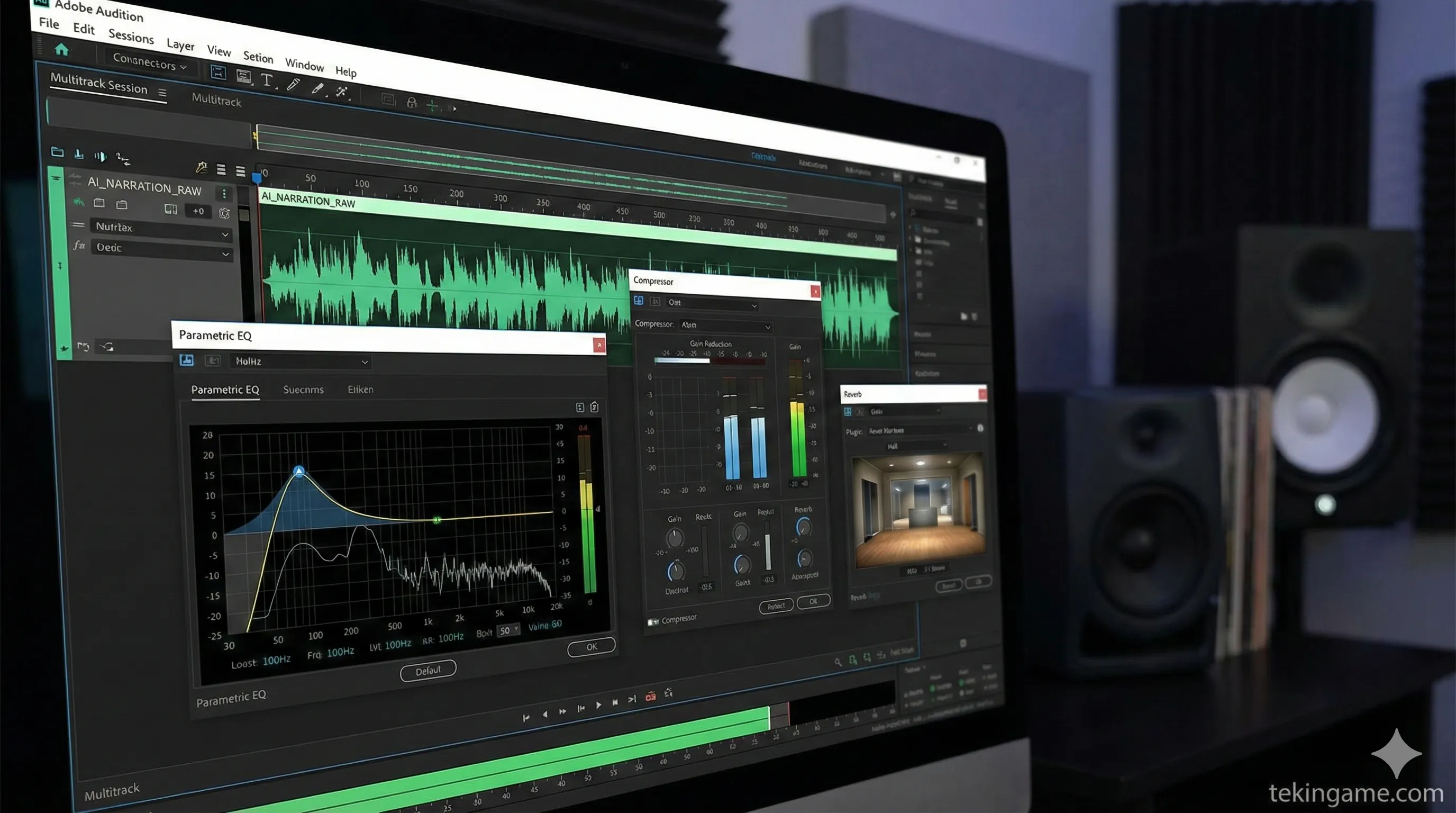
This is the step that 90% of YouTubers skip, and it is why their AI voices sound "fake." Raw AI audio is often dry, flat, and digitally sterile. To make it sound like a BBC production, you need to process it. You can use Audacity (Free) or Adobe Audition.
The "Documentary Chain" (Apply in order):
1. De-Clicking / De-Essing
AI generation often leaves tiny digital clicks or harsh "S" sounds (sibilance). Use a De-Esser to soften the "S" sounds so they don't pierce the listener's ear.
2. Parametric EQ (The Magic Step)
You need to sculpt the frequencies:
- High-Pass Filter: Cut everything below 80Hz. This removes low-end rumble that muddies the sound.
- The "Voice of God" Boost: Boost the frequencies between 100Hz and 150Hz by +2dB or +3dB. This adds that warm, chesty resonance.
- The Clarity Boost: Add a slight shelf boost around 4kHz - 5kHz. This makes the voice articulate and crisp.
3. Compression
A documentary narrator needs to be consistent. You don't want the whisper to be inaudible and the shout to blow out the speakers. Use a Compressor with a Ratio of 3:1 or 4:1. This "squashes" the dynamic range slightly, making the voice sound louder and more present without peaking.
4. Reverb (The Space)
Raw AI audio sounds like it was recorded in a vacuum. Add a very subtle "Room" or "Studio" Reverb (Wet/Dry mix around 5-10%). This places the voice in a physical space, making it feel real to the human brain.
6. ⚖️ The Danger Zone: Ethics & Safety
With great power comes great responsibility. Voice cloning is powerful, but it walks a fine ethical line.
- Consent is King: Never clone the voice of a non-public figure without their permission. It is invasive and potentially illegal.
- The "Deepfake" Trap: Do not use these tools to make public figures say things they never said (political misinformation, hate speech). ElevenLabs has safety guardrails and "Audio Watermarking" that can detect if audio was generated by their system.
- Transparency: If you use an AI narrator for your YouTube channel, be honest. Put a disclaimer in the description: "Narration generated using AI tools." Audiences appreciate transparency, and it protects you from "Misleading Content" strikes.
7. Inspector's Verdict: Which Tool Should You Choose?
Commanders, we have analyzed the evidence. Here is the final breakdown:
✅ The Pro Path: ElevenLabs
If you have a budget ($5-$22/month) and you need results fast. If you want the "Speech-to-Speech" capability to act out your narration. If you need the highest quality multilingual support (including excellent Persian/Farsi). This is the tool for professionals.
✅ The Hacker Path: OpenVoice
If you are on a $0 budget. If you are a developer who wants to run models locally. If you want to experiment with changing the "Tone Color" of existing audio files without generating new speech from text. This is the sandbox for the tech-savvy.
🎬 Your Mission for Today
Log into ElevenLabs (the free tier gives you 10,000 characters). Find a paragraph from a book. Try generating it twice: once with Stability 100% and once with Stability 35%.
Can you hear the "ghost" in the machine on the lower setting?
Let us know your results in the comments below! 👇